worship & dance in the park
Tuesday, July 31, 2012
Thursday, July 26, 2012
Sunday in the Park
LIVE CONTEMPORARY CHRISTIAN MUSIC
AND DANCE
SUNDAY, JULY 29, 3 – 8 PM
GRIFFIN PARK BAND SHELL
Hosanna Dance Overnight Deliverance
Also Featuring :
Heather Graham Badger
New Life Worship Team
Others to Be
Announced
Bring your Lawn Chairs and Snacks and Enjoy the Music
SUNDAY IN THE PARK - LIVE CHRISTIAN MUSIC
Merlyn Hilmoe, a local worship enthusiast, will sponsor a live concert for the community with a variety of area Christian musical groups at Griffin Park Band Shell on Sunday, July 29, 3 – 8 pm.
First Baptist Church will begin the day with 9:30 a.m. worship near the Band Shell in Griffin Park, with the bluegrass gospel band “Heir Force” from NewLife Assembly in Pierre. Pastor Lizette Hunt says, “Come on out and enjoy the entire day!"
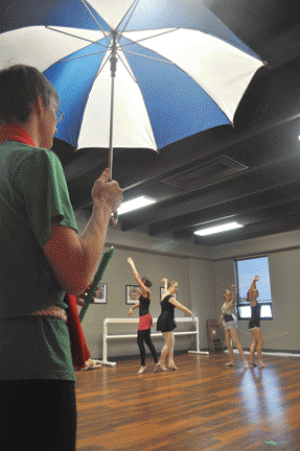
River Center Worship Team will lead off the 5-hour concert at 3 p.m., followed by New Life Worship, Pastor Brad Gienger and family, Changed, Heather Badger, and Overnight Deliverance. Hosanna Dance Studio dancers have been renamed the “Hosanna Rain Dancers” for the day and will perform several numbers between the musical groups, as will soloist Jenna Goehring.
There will be opportunities to pray for rain and other community needs, and to receive prayer for individual needs. Bring your lawn chairs and refreshments and stay for an hour or for the entire concert.
Tuesday, July 24, 2012
future performances
Monday, June 4, 2012
Tuesday, April 17, 2012
Dancing into Narnia: Hosanna Dance program is Friday - Capital Journal: News
Dancing into Narnia: Hosanna Dance program is Friday - Capital Journal: News: Fauns, dryads and human children dance in a land called Narnia – and also on stage at the Riggs High School Theatre in Pierre.
continue reading...
![]() |
| By Lance Nixon |
Thursday, March 15, 2012
Thursday, March 1, 2012
Experiences on borrowing ebooks
I would imagine different people would find different readers as easiest. I haven’t tried all the different ebook readers that work with SD Titles To Go but here are my experiences with borrowing library ebooks…
I have a Kindle Fire (got it a couple weeks ago). It has been very easy to check out books from Titles To Go. I haven’t had to connect to a computer to download any of the books – everything done on the Kindle using wifi. Even for the books that said download via computer usb only, I still didn’t have to connect to a computer – worked fine using wifi. For me it is much easier to not have to connect to a computer to download a book before I can read it.
I haven’t tried to get Titles To Go audiobooks on the Kindle Fire yet -- would probably have to use the computer for that or I have seen that there is a way to get the Overdrive app or media console on the Fire so that the MP3 audiobooks could be downloaded directly (without using a computer) but I haven’t tried that yet. I haven’t yet gone beyond trying the easy & immediately available options with this new gadget.
I also have the Overdrive app on an iPod Touch which should be pretty similar to using the iPad, only a whole lot smaller. This works pretty easy once you get the app setup. You do have to get an Adobe ID (free) first in order to set up the overdrive app, but once that is done you’re ready to go. You can get EPUB books and MP3 audiobooks without using a computer. The last time I tried the WMA audiobooks, though they are compatible, I did have to use a computer to download & transfer the file. I don’t know if that has changed, it’s been a few months.
I also have an iPod classic that I have used for MP3 & WMA audiobooks in Titles To Go. You definitely have to use a computer to download & transfer the books using the Overdrive Media Console that you download on to your computer. It’s been awhile since the last time I did this.
I believe that for Nook Readers you have to connect to a computer to download books from Titles To Go and also have Adobe Digital Editions (free) on your computer.
I also have the Nook app & Kindle app on the Touch. Haven’t used them a whole lot.
You can probably see a trend going here… what I personally find easiest (of the options I have tried) are the ones I use most frequently – the options where I don’t have to connect to a computer. It may not be what others find easiest.
The Get Started With… page is useful to see what steps are involved in using each of the various compatible devices http://help.overdrive.com/?Sup=http://southdakota.lib.overdrive.com/Support.htm
I have a Kindle Fire (got it a couple weeks ago). It has been very easy to check out books from Titles To Go. I haven’t had to connect to a computer to download any of the books – everything done on the Kindle using wifi. Even for the books that said download via computer usb only, I still didn’t have to connect to a computer – worked fine using wifi. For me it is much easier to not have to connect to a computer to download a book before I can read it.
I haven’t tried to get Titles To Go audiobooks on the Kindle Fire yet -- would probably have to use the computer for that or I have seen that there is a way to get the Overdrive app or media console on the Fire so that the MP3 audiobooks could be downloaded directly (without using a computer) but I haven’t tried that yet. I haven’t yet gone beyond trying the easy & immediately available options with this new gadget.
I also have the Overdrive app on an iPod Touch which should be pretty similar to using the iPad, only a whole lot smaller. This works pretty easy once you get the app setup. You do have to get an Adobe ID (free) first in order to set up the overdrive app, but once that is done you’re ready to go. You can get EPUB books and MP3 audiobooks without using a computer. The last time I tried the WMA audiobooks, though they are compatible, I did have to use a computer to download & transfer the file. I don’t know if that has changed, it’s been a few months.
I also have an iPod classic that I have used for MP3 & WMA audiobooks in Titles To Go. You definitely have to use a computer to download & transfer the books using the Overdrive Media Console that you download on to your computer. It’s been awhile since the last time I did this.
I believe that for Nook Readers you have to connect to a computer to download books from Titles To Go and also have Adobe Digital Editions (free) on your computer.
I also have the Nook app & Kindle app on the Touch. Haven’t used them a whole lot.
You can probably see a trend going here… what I personally find easiest (of the options I have tried) are the ones I use most frequently – the options where I don’t have to connect to a computer. It may not be what others find easiest.
The Get Started With… page is useful to see what steps are involved in using each of the various compatible devices http://help.overdrive.com/?Sup=http://southdakota.lib.overdrive.com/Support.htm
Monday, January 23, 2012
Tuesday, January 3, 2012
Thursday, September 15, 2011
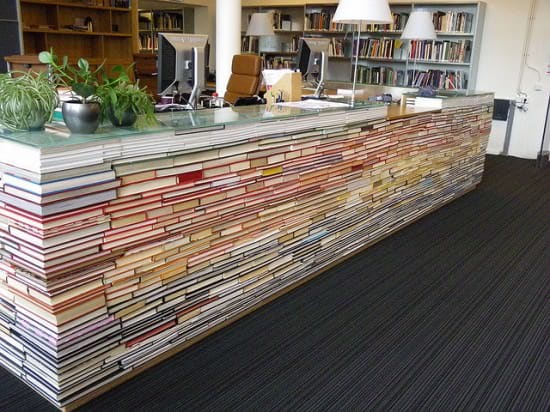
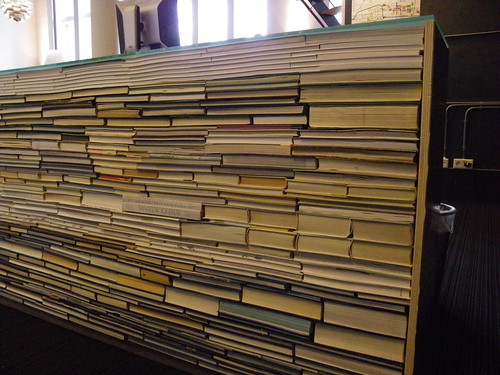
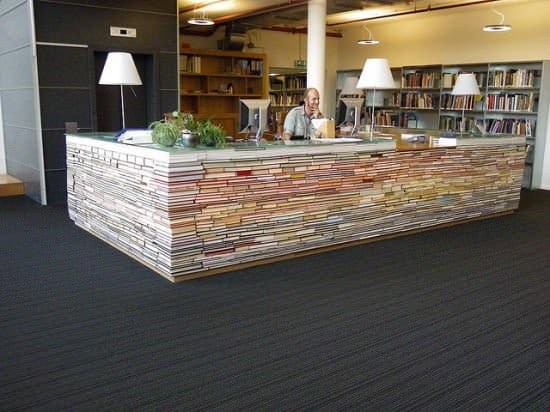
Library information desk
library of the Faculty of Architecture of the TU Delft Library
Delft, Netherlandslibrary of the Faculty of Architecture of the TU Delft Library
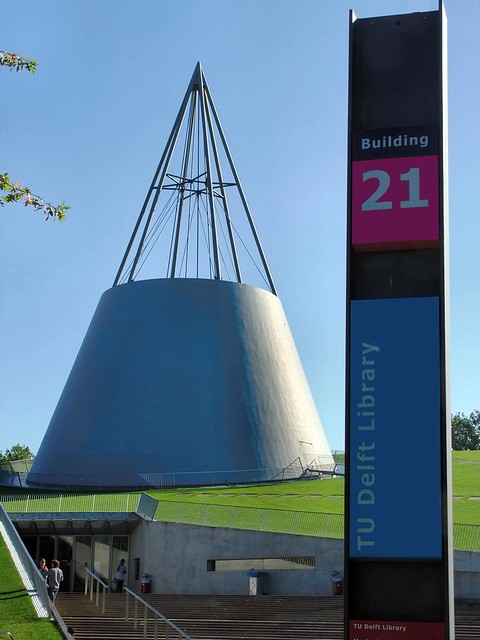
The large lawn roof is tilted up at one corner like a sheet of paper held by a single point. The hollow beneath houses the library. A cone, the symbol of technology, pierces the library and the landscape, affixing them like a pushpin. With a grass-covered roof, high-performance glazed facades and subterranean storage for heating and cooling, the building reaches high standards of sustainability. The entrance affords a glimpse of the sunken book stacks for rare and irreplaceable books. Inside the towering suspended bookcase for the less fragile books astonishes the visitor. The deep blue background gives the wall-to-wall racks the feel of a theatre set. The columns in the central hall are not only structural but also provide lighting and heating. The sloping metal ceiling continues without interruption across all spaces above a floor the colour of Saharan sand.
... A huge cone pierces the green expanse, articulated by a 1500 mm wide necklace of glazing in the plane of the roof. Supported on splayed steel columns, the cone houses four levels of traditional study spaces connected by a helical stair. Within the cone, a central void provides daylight from a glazed roof to the internal reading spaces. The apex of the cone is formed by an open frame. Extending forty metres above grade and floodlit at night, the cone acts as a beacon on the campus day and night.
... Designated as the national library for technical and natural sciences, the facility is also connected electronically to major libraries around the world. The library thus satisfies both electronic needs and the sensory pleasures derived from being able to touch and smell the books.
http://www.mecanoo.nl/Default.aspx?tabid=135&pcode=A126&subs=false
Subscribe to:
Posts (Atom)